Join the ProjectXL Alpha: track funding, ETC and EAC in Excel
ProjectXL shows when your funding runs out, and calculates ETC and EAC from your plan. If you track funding and forecasts in spreadsheets today, we want your help.
Start your 7-day free trial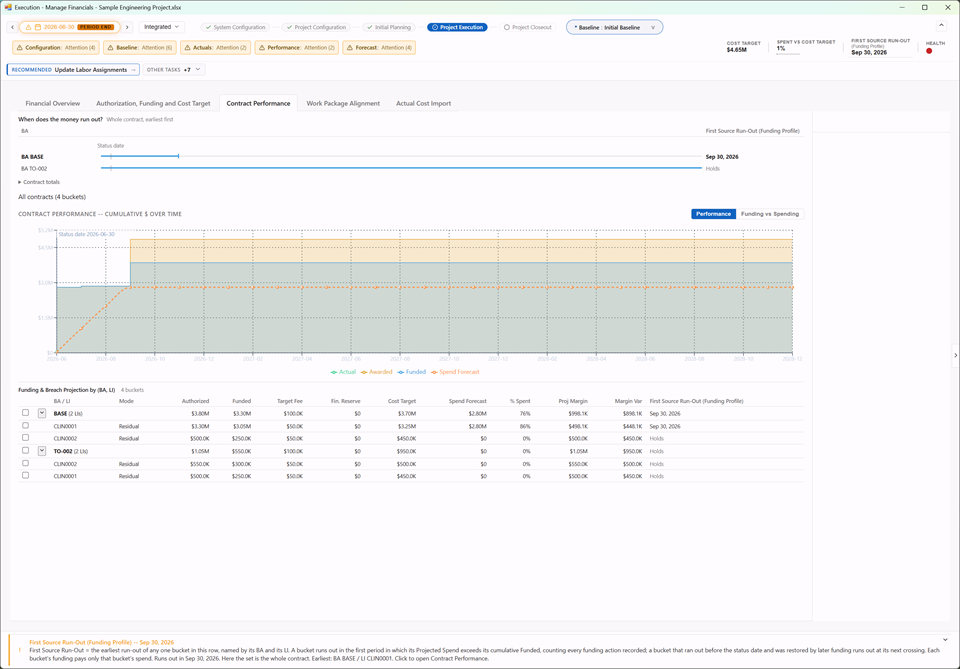
What ProjectXL is. ProjectXL is an Excel add-in. It is an integrated project control system, with its own scheduling, cost and earned value calculations, that uses Excel as a primary user interface. Your project data is in Excel tables that you edit and analyze with the Excel tools you already use. ProjectXL adds journey guidance, which shows where your project stands and what to do next, and live data checks that flag problems as you work. Together they help you keep your data correct and follow the same process every reporting period.
How ProjectXL tracks funding and forecasts cost
-
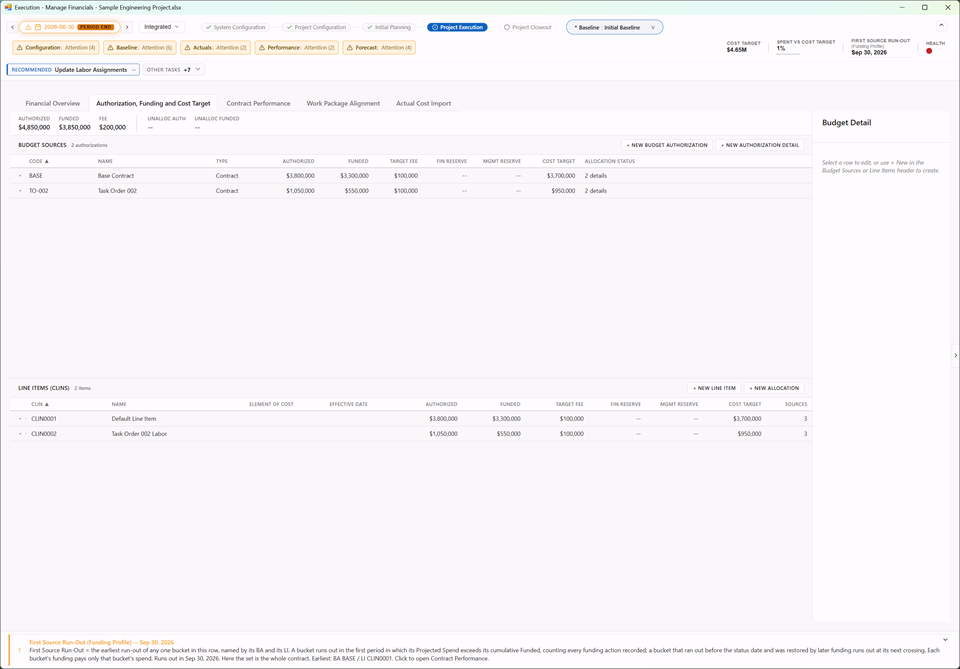
Funding by source and contract line item. Record each funding action with its authorized and funded amounts, its target fee and its period of performance. Enter a de-obligation as negative funding. Allocate each funding action to contract line items (CLINs). Each allocation has a ceiling, a fee ceiling and reserves.
Which funding runs out first, visible from any workspace. -
The date your funding runs out. A project can be within its budget and still run out of funding. ProjectXL projects awarded, funded, actual and forecast spend for each reporting period. It shows the First Source Run-Out: the date when the first funding source runs out, or is projected to run out.
-
ETC and EAC calculated from the plan. ETC is the cost of the remaining plan: the remaining hours on each labor assignment, and the non-labor costs planned after the status date. EAC is actual cost plus ETC. You do not type a forecast into a summary row. To change the forecast, you change the plan. The baseline does not change.
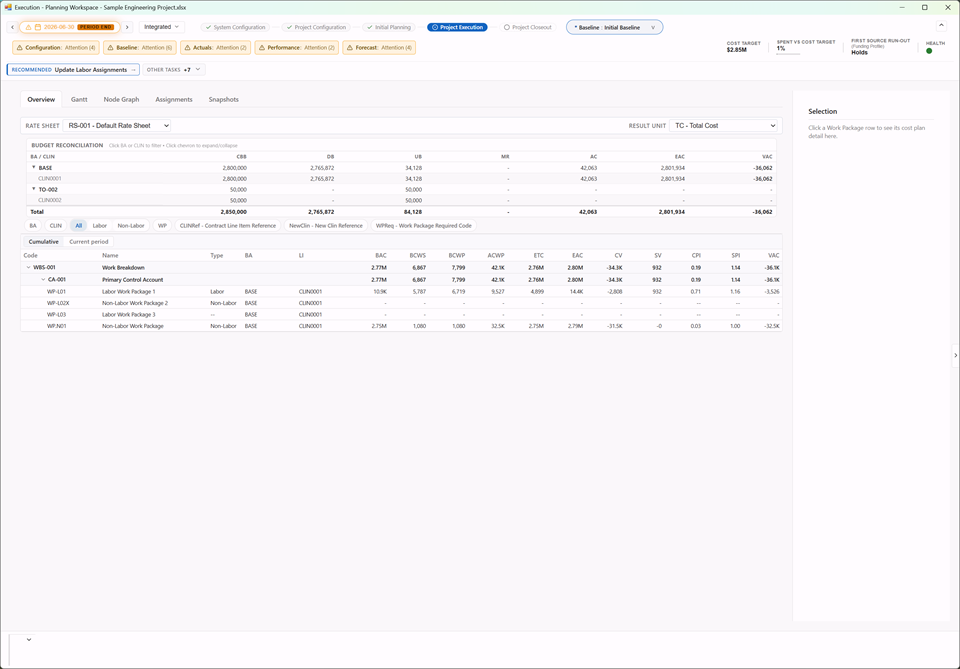
The numbers your monthly review asks for, rolled up from the Work Packages.
What works in the Alpha today
Funding and contract line items
- Work Packages and line items. Link each Work Package to the funding source and the contract line item that pay for it.
Actual costs
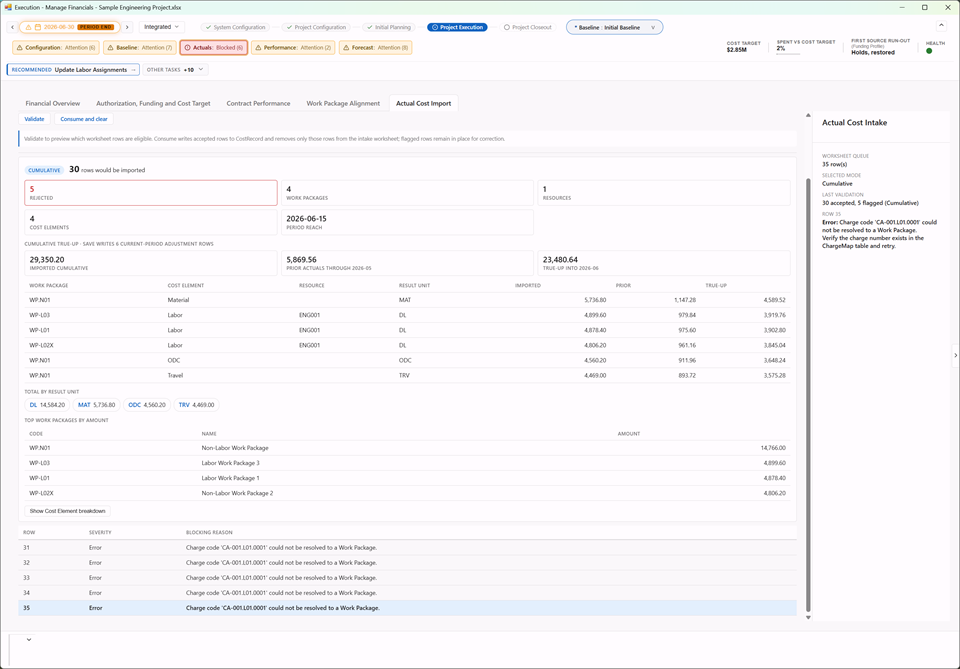
- Actual cost import. Paste actual costs from your accounting export into a staging table. ProjectXL checks each row and shows what it will save. Import incremental amounts, or cumulative amounts that ProjectXL compares with the actual costs already recorded.
ETC, EAC and earned value
- Earned value. BAC, BCWS, BCWP, ACWP, ETC, EAC, CV, SV, CPI, SPI and VAC for each Work Package, with totals for each Control Account and WBS element. See the cumulative figures or the current reporting period.
- Month-end status. Save each month-end status as a named snapshot of the whole project. Compare two snapshots to see which Work Packages changed.
The schedule in the same workbook
ProjectXL also calculates a CPM schedule with a critical path. Each Work Package holds its schedule and its cost, so the two stay together.
The Alpha offer
The Alpha is for early adopters: cost analysts who want working funding and forecast tools now, at a low price, and who want to help shape ProjectXL.
What you get: every feature on this page; a license you can use until one year after the first Public Release; and a place in the Alpha product development forum.
What to expect: the Alpha does not have every planned feature yet. Some parts of the user interface still need work. We are fixing them.
The price
| Release | Price |
|---|---|
| Alpha (now) | $50 |
| Beta | $100 |
| Public Release | $200, or $20 per month |
Try the Alpha free for seven days before you buy.
Questions from cost analysts
- Does ProjectXL connect to my accounting system?
- No. You export actual costs from your accounting system and paste the rows into ProjectXL. ProjectXL checks the rows before it saves them.
- Is ProjectXL an accounting system?
- No. ProjectXL tracks funding and cost performance. It does not do invoicing, billing, revenue recognition, receivables or payables.
- What do I need?
- Windows 10 (version 2004 or later) or Windows 11, Microsoft 365 desktop Excel, and an internet connection to activate the license.
- Does my project data leave my computer?
- The cost and schedule calculations run on your computer. ProjectXL uses the internet to check the license. If you turn on the AI assistant, it sends project data to the AI provider you choose, with your own key.
- Are there limits I should know about?
-
- The figures that use the baseline (BAC, BCWS, BCWP, CV, SV, CPI, SPI and VAC) need an active baseline.
- When you start a project, you choose a journey. Funding, actual costs and earned value are in the Integrated journey, not in the Schedule Only journey.
Start using ProjectXL now, and help us build the cost tools you want.
Start your 7-day free trial